Tuesday, October 21, 2014

date windows updates were installed

You have a need to present the dates of installed updates in Windows Servers. WSUS gives you which patches, but not when.

2003:

if you haven't used pstools, please download and read and use. http://technet.microsoft.com/en-us/sysinternals/bb896649.aspx

Use psinfo:

psinfo -h \\remotecomputer > d:\path\server.txt

the > sends the output to a file you define.
you can omit \\remotecomputer if you are running locally


2008:

use this wmic script

wmic qfe list full /format:htable > d:\path\server.htm

the > sends the output to a file you define.

Saturday, July 5, 2014

Nested ESXi lab - part 1 - getting the right downloads for the main site

I reviewed what I want to accomplish in this lab in

http://learning-in-it.blogspot.com/2014/07/nested-esxi-lab-design-thoughts.html

Now I get to do it.

The first site will be done in VMware workstation v9. I use this version because when I got the VCP certification, they gave me a free license. However, you can buy or get a trial license from the vmware.com site. I believe all trials are for 60 days.

I am using the linux version - just because i'm trying to learn linux, and there's no better way to learn than doing - but you can probably do the same things in the windows version. If you have problems running the linux version, please see this post http://learning-in-it.blogspot.com/2014/05/installing-vmware-workstation-9-in.html

First let's download the appropriate ISOs:

VMware

You'll need to setup a free account if you don't have one already. I will attach screenshots since some friends have asked me exactly what to download.

In my case I will enroll in a vSphere with Operations Management (also called vSOM) trial.


Here is where you create or login to your MyVMware account (usual activation steps required)


Make a note of the evaluation license key and let's download the required packages.


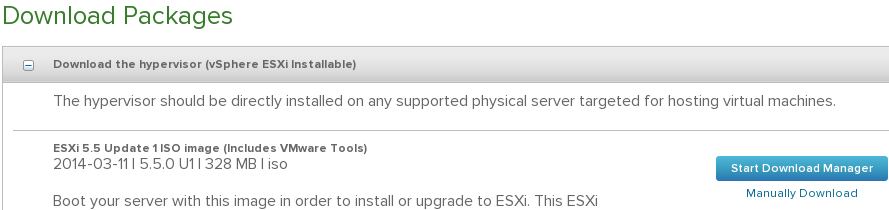
ESXi - this iso is typically around 300MB. This lab will be done on ESXi5.5. I will be actually using an older one so we can patch it once installed, but here is the image of how it looks


vCenter - this is the windows installer, we will use it on the remote site. This is typically a 3GB ISO. I will use an older version and then upgrade it with the newest as part of the lab. The windows C# vsphere client is included in this ISO, so there is no need to download it separately.


vCenter appliance. Download either the one .ova file, or the very small ovf file and both disks (check for vmdk). Why both options? OVA is a tar of an OVF. Workstation can open ovf and vmdk's directly, but it will need to unzip the OVA.


Operations management is it's own OVA file. This will be the last one we download for now.


Openfiler

This is basically linux based SAN software. For the main site, I will use it as a iSCSI target. It's simple and small enough (500MB download) for my purposes. I will change this in the recovery site and use NFS instead there for study purposes.

https://www.openfiler.com/

We will download the v2.99 ISO and create our own VM. i know there's a prepackaged one there, but see what I do and then decide for yourself. Cick on the community edition and the download arrow.


don't forget to read the system requirements

https://www.openfiler.com/products/system-requirements


Microsoft

We will download a trial of Server 2012 R2 to setup AD. I actually want to test an installation with no GUI for the recovery site, see how managing that works. Make sure you choose the ISO download option. You will need a microsoft related account to register.


Always important to read the system requirements http://technet.microsoft.com/library/dn303418.aspx . Note also that this trial runs for 180 days.

We will also download a SQL Server trial. We will use it with the windows based vCenter in our recovery site. VMware vCenter includes an embedded, free edition of MS SQL, but nobody uses that in a real company - it is very limited. You should involve your company's DBA to take care of your vCenter SQL DB and have it run as best as it can. Installation is tougher this way, but when you work with your DBA and tell him dbo rights are really required, you will understand why.

Important caveat - as of this writing, SQL server 2014 is not in the VMware inter-operatibility matrix - 2012 is the newest supported one.


This is the link for the 2012 trial http://www.microsoft.com/en-us/download/details.aspx?id=29066

Also read the system requirements http://msdn.microsoft.com/library/ms143506(v=SQL.110).aspx

Linux

We need some VMs. We already have the 2012 R2 installer, but we should also practice Linux. My workstation runs on Fedora, but in an effort to branch out, I will use the Ubuntu 14.04 LTS server

http://www.ubuntu.com/download/server


Al of these downloads are upwards of 12GB, so make sure you have them ready before starting the next step.

Nested esxi lab - design thoughts

I will create a lab with 2 sites, one site using VMware Workstation on my laptop and the other will be a physical ESXi host.

In each, we will create nested ESXi v5.5 hosts.

The objectives of this lab are:

1) practice for VCAP-DCA
2) learn and test vSphere replication and SRM
3) learn and test vCops

We will also work with

Active Directory - one ADDC for each site, running in the nested ESXis
iSCSI on the main site with Openfiler running on a VM at the same level as the nested ESXis
NFS on the backup site, with TBD running on a VM at the same level as the nested ESXis

One vcenter will be the appliance and another the windows version, running on the nested ESXis

The hardware we have:

both i7
both 32 gb ram
both have one SSD and one hard disk
communicating over a home wireless 802.11ac (not exactly gigabit, but this simulates commercial WAN links fairly decently)

All will run on temporary licenses.

Friday, July 4, 2014

webm test using gnome screenshot's screencast function

I will document my VCAP studies lab setup for anyone who finds themselves in this position. I also plan to learn vSphere replication and SRM with this lab, using a laptop as the production site and a desktop as the recovery site.

Since I switched to Linux less than a year ago, i've found different ways to solve the same problems I had in windows. The prt scn (print screen) button does not work by default - you have to install a tool for it. A google seach recommends a tool called Shutter; I had already installed GNOME Screenshot.

While searching for he hot keys, I found a feature that interested me in the GNOME Screenshot tool called Screencast.

https://help.gnome.org/users/gnome-help/stable/screen-shot-record.html.en

This basically allows you to take a small video of what you are doing. It stores the files as .webm - the HTML5 video format that is supported by all modern browsers.

So, here is my first webm embedded video in a blog post - let's see how it looks.

webm test


good news - it runs as advertised. bad news is the resolution sucks, and it grabs all the desktop (in my case, 2 screens). I will update this when I find a solution where 1) i can specify what's recorded, instead of all the desktop 2) i can read what's recorded.

Thursday, July 3, 2014

Windows partition sizes in 2012 R2 for people that like XXX.0 in their disk list

When you are creating your disk partitions, you have options. You might be one of those persons that like to see disk drive sizes as 146.0 instead of 149.56. If you are one of those, you will find out how to calculate the disk size in the following lines:

When installing windows, choose custom. The default system reserved partition changed is now 350 MB. Use this formula if you want to get, say, 146GB as a drive C size:

Add 350 MB to 146GB (converted to MB), 1 MB for MBR partitioning space lost, and fill the value. The calculation is 146x1024+350+1 = 149855

For disks that will be partitioned with GPT, use 2 MB instead of one for MBR.

Friday, June 27, 2014

SEP 12 nugget to stop the service in windows server 2003

You may know that in windows 2003 you can't stop the SEP service from the Services snap-in, but you can from command line:

start smc -stop

or

start smc -start

What I didn't know, and just confirmed today, is that the command only works if the GUI is not running :p

Sunday, June 1, 2014

my vcap strategy for dca and dcd

My biggest goal this year, apart from living happily with my loved ones, is getting the VCAP certifications in datacenter administration (dca) and datacenter design (dcd). I already took the requisite courses, but studying for the certification is a whole different matter. Here is how I plan on attaining them.

(Note - the amazon links below have my partner code, meaning if you buy the books through these links, my account balance won't be a big fat zero, like it has been for many years straight... I realize it looks like a sales post).

First, decide which one to pursue first:

I think I have decided to do DCA first, since it's more technical and requires you to learn more than what was already covered in the VCP5-DCV. This will allow me to be more knowledgeable when I study for the DCD exam: it will allow me to understand why a design criteria is better than another, and in which scenarios a certain approach is better.

Second, focus on re-learning what I studied for the vcp, with the 5.5 version. For my VCP exam, I read scott lowe's mastering vsphere 5.0 from the first to the last page. I put it here as a reference, in case someone wants to do the 5.0 versions of the exams, instead of the 5.5 - but I would buy the 5.5 version if I were new to all this.


There were many topics in the book that were not included in the vcp blueprint, and thus I didn't really try them out on the labs. The vcap-dca is probably the only exam that goes deep into every feature of vsphere, so now is the time to dig deep and do labs on every topic. Also, since the book has a new version out, I will use this book and again read it it from page one to the last page, but this time trying to do labs for everything.


Once I have finished the book I will schedule the exam - probably with a month of wiggle room. I will then focus on the blueprint, the study guides, and other resources, such as vBrownBag podcasts, or whatever google throws at me. I will also finally read the clustering deep dive, which I had bought for a very reasonable price as a Kindle edition. There will be no 5.5 version of this book, since the authors stated there were not many changes between 5.1 and 5.5.


By this time I should have identified many holes in my knowledge, and I should be referring to the vmware documentation and google to clear any confusions. However, I will also ask my employer to buy the certification book, which was recently released:


Lastly, I will double-check the course materials and labs, any mock exams I find, and commend myself to my creator.


Assuming success, then...


For the DCD, I will follow a similar approach. This time, it's another Scott Lowe book, "VMware vSphere Design".


and hopefully my employer sees value in his new VCAP-DCA and allows me to expense the other certification book:


(Please be careful when buying the certification books - sometimes the bonus exam content is only available in the print edition.)

I had assumed the design test would be with a live panel, but apparently it's also computer-based. Hopefully with the DCA VCAP and these books, it will be an easy exam :)


And that should be it. It is an attainable goal - more than half of the year is still available. Wish me luck, internet!